exit lab
AX Engineering

Engineering reliable human + AI development workflows.

The concepts behind AI-assisted development: context, instructions, skills, agents, tools, MCP, guardrails, verification, evaluations, and feedback. For the tool-by-tool commands and configuration, read the Agent Coding Handbook.

Modern Software Engineer roadmap poster

Visual overview · the responsive learning path continues below
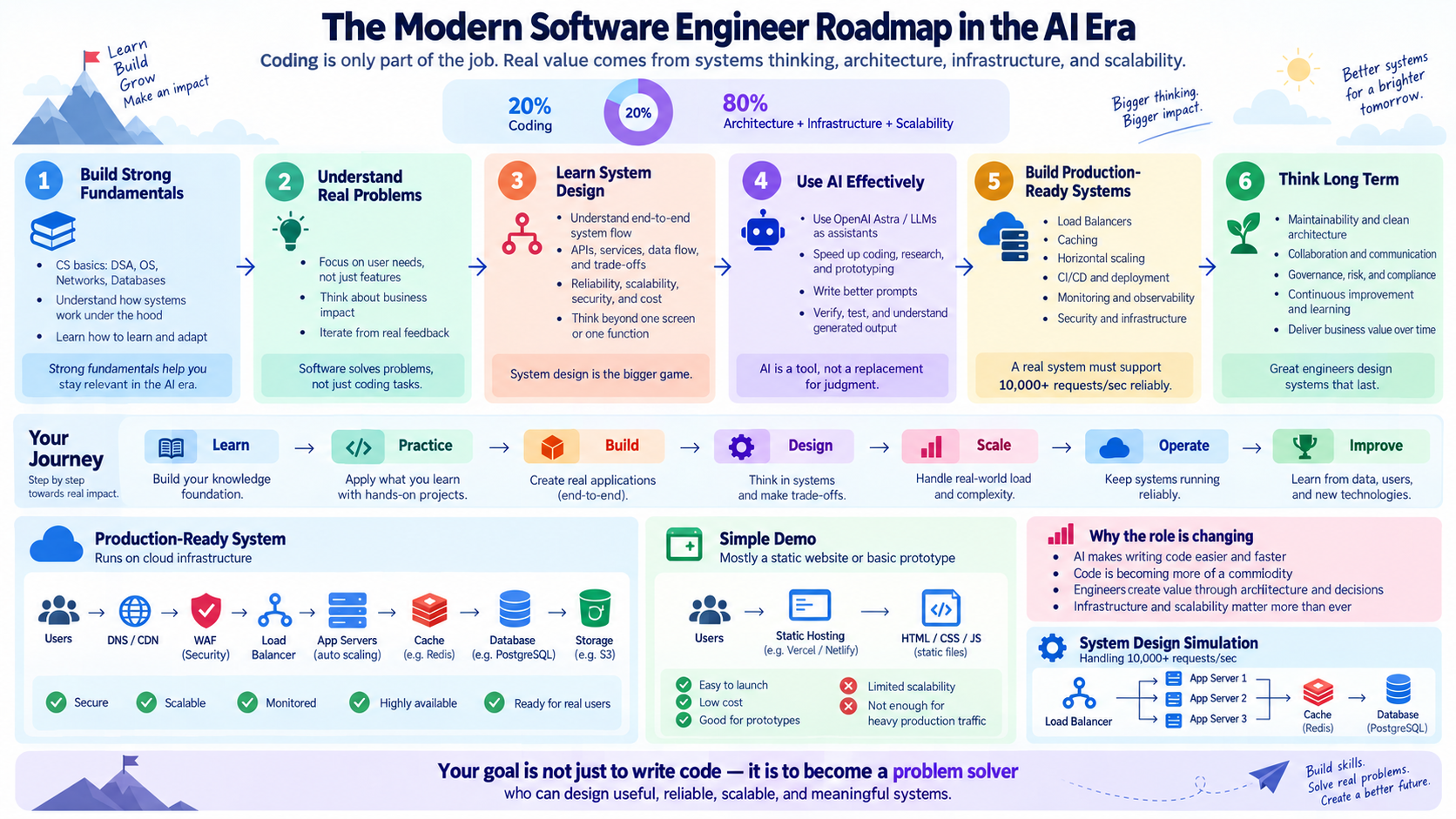
Modern Software Engineer roadmap showing six stages from fundamentals through long-term improvement
The poster provides the big picture. The semantic flows, modules, and labs below remain the accessible source of detail on smaller screens.

Core mental model

Reasoning needs an operating environment

Human-guided agent development loop

Human
Agent Harness
AI Agent / Model
Tools
Software
Verification
Feedback
The model provides reasoning. The harness provides the operating system around that reasoning: context, tools, permissions, workflow, verification, and state.

Agent Harness architecture

The system around the model

A harness combines knowledge, execution, control, and improvement layers. Each part has a narrow job; together they make agent work easier to guide, inspect, and verify.

End-to-end workflow

From requirement to feedback

This is a learning model, not a claim that every task needs every stage. The harness should scale its controls to the work and its risk.

  1. Stage 01

    Frame

    1. RequirementDefine the outcome and constraints.
    2. Load InstructionsApply project rules and boundaries.
    3. Retrieve ContextSelect relevant code and evidence.

    Outcome: A grounded task

  2. Stage 02

    Decide

    1. PlanSequence verifiable work.
    2. InvestigateTest assumptions against current state.
    3. Tool Calls / MCPUse authorized capabilities.

    Outcome: An evidence-based plan

  3. Stage 03

    Build

    1. ImplementMake the smallest coherent change.
    2. HooksRun deterministic lifecycle automation.
    3. Quality GatesCompile, test, lint, and inspect.

    Outcome: A checked change

  4. Stage 04

    Verify

    1. Independent ReviewSeek a separate critical pass.
    2. EvalMeasure expected agent behavior.
    3. Human ApprovalKeep accountable decisions with people.

    Outcome: Reviewable evidence

  5. Stage 05

    Deliver & learn

    1. PR / CIUse standard integration controls.
    2. HandoffTransfer verified state and risks.
    3. Learn / ImproveFeed evidence into the next iteration.

    Outcome: A durable handoff

Learning roadmap

A deliberate learning sequence

Backend engineering remains the foundation. This path adds the practices needed to explore reliable AI-assisted development systems.

  1. 01

    Orient

    Understand AX and the harness

    1. 00AX Engineering Overview2–3 hoursLearning

      Build a practical vocabulary for reliable human + AI software-development workflows.

      • AX engineering
      • human oversight
      • agent harness
    2. 01AI-Assisted Development3–4 hoursExperimenting

      Practice using models as collaborators while keeping engineering judgment and verification with the human.

      • task framing
      • review
      • verification
    3. 02Agent Harness Fundamentals4–6 hoursLearning

      Understand the operating layer that connects a model to project context, tools, policy, and feedback.

      • harness
      • control loop
      • state
  2. 02

    Prepare

    Shape context and guidance

    1. 03Context Engineering4–6 hoursPlanned

      Select, structure, and refresh the information an agent needs without flooding its context window.

      • retrieval
      • context budget
      • relevance
    2. 04Project Instructions3–4 hoursPlanned

      Write durable repository guidance that makes conventions, boundaries, and verification steps explicit.

      • AGENTS.md
      • scope
      • conventions
    3. 05Skills3–5 hoursPlanned

      Package repeatable engineering procedures as focused playbooks an agent can apply when relevant.

      • playbooks
      • triggering
      • reuse
  3. 03

    Execute

    Coordinate agents and tools

    1. 06Agents & Subagents4–6 hoursPlanned

      Explore role boundaries, delegation, independent review, and the cost of coordination.

      • agent
      • subagent
      • delegation
    2. 07MCP & Tool Calling5–7 hoursPlanned

      Learn how agents discover and invoke controlled capabilities through typed tool contracts.

      • MCP
      • tools
      • schemas
    3. 08Planning & Orchestration4–6 hoursPlanned

      Break work into observable steps, manage dependencies, and adapt plans as evidence changes.

      • planning
      • orchestration
      • checkpoints
  4. 04

    Control

    Constrain and verify work

    1. 09Permissions & Guardrails4–6 hoursPlanned

      Constrain what an agent can read, change, execute, and send according to risk.

      • least privilege
      • approval
      • policy
    2. 10Sandbox & Git Worktrees4–5 hoursPlanned

      Isolate execution and parallel code changes so experiments are easier to inspect and recover.

      • sandbox
      • worktree
      • isolation
    3. 11Hooks & Automation3–5 hoursPlanned

      Attach deterministic actions to lifecycle events such as edits, tool calls, commits, and completion.

      • hooks
      • automation
      • lifecycle
    4. 12Quality Gates4–6 hoursPlanned

      Require compile, lint, test, security, and review evidence before work advances.

      • tests
      • static analysis
      • review
  5. 05

    Improve

    Measure, observe, and continue

    1. 13AI Evaluations5–8 hoursPlanned

      Design repeatable checks for task outcomes, behavior, safety, and regression detection.

      • eval cases
      • graders
      • regressions
    2. 14Observability4–6 hoursPlanned

      Capture traces, tool activity, outcomes, latency, and cost so agent behavior can be understood.

      • traces
      • metrics
      • audit trail
    3. 15Memory & Handoff4–6 hoursPlanned

      Preserve useful decisions and transfer concise state without treating stale notes as truth.

      • memory
      • handoff
      • state
    4. 16CI/CD Integration4–6 hoursPlanned

      Connect agent contributions to familiar pull-request checks, approvals, and delivery controls.

      • CI/CD
      • pull requests
      • approval
  6. 06

    Capstone

    Design a general harness

    1. 17Build a General Agent Harness8–12 hoursPlanned

      Combine the curriculum into a small, technology-neutral harness design before applying it to Spring.

      • integration
      • trade-offs
      • capstone

Tools and concepts

A practical harness vocabulary

Open any concept for a concise explanation. The analogies are memory aids; the technical descriptions define the actual role.

ContextAnalogy: Relevant reference desk
What is it?
The task, code, documentation, history, and evidence available to the model for its current decision.
Why do we need it?
A capable model still produces weak work when it receives missing, stale, or distracting information.
How does it work?
The harness selects scoped files and facts, retrieves related material, and refreshes context as the task changes.
Simple example
Load the Spring service, its tests, API contract, and repository rules before changing an endpoint.
When should I use it?
For every task; increase retrieval and summarization as the codebase or session grows.
InstructionsAnalogy: Engineering handbook
What is it?
Explicit rules that define goals, coding conventions, boundaries, and required checks.
Why do we need it?
Stable expectations should not depend on the model guessing them from nearby code.
How does it work?
Layer general guidance with directory-specific instructions, resolving conflicts by scope and priority.
Simple example
An AGENTS.md says to use Flyway for schema changes and run integration tests before completion.
When should I use it?
When a convention or safety rule should apply repeatedly across tasks.
SkillsAnalogy: Playbooks
What is it?
Reusable procedures for a focused kind of work, such as adding a REST endpoint or reviewing a migration.
Why do we need it?
A playbook makes proven steps discoverable and repeatable without overloading global instructions.
How does it work?
The harness matches a task to a skill, loads its complete procedure, and follows its tools and checks.
Simple example
A backend implementation skill guides controller, service, validation, test, and documentation changes.
When should I use it?
When a workflow repeats and benefits from domain-specific steps or templates.
AgentsAnalogy: Engineer
What is it?
A model operating in a loop that can inspect state, decide on actions, use tools, and evaluate results.
Why do we need it?
Multi-step engineering work needs interaction with real project state, not only one generated answer.
How does it work?
The harness supplies goals and capabilities; the agent alternates reasoning, action, observation, and adjustment.
Simple example
An implementation agent inspects a failing test, edits the service, reruns the test, and reviews the diff.
When should I use it?
For bounded tasks that require several evidence-driven actions.
SubagentsAnalogy: Specialists
What is it?
Separate agent contexts delegated a focused investigation, implementation, or review task.
Why do we need it?
Specialization can reduce context noise and provide an independent perspective.
How does it work?
A coordinating agent gives a precise scope and expected output, then integrates and verifies the result.
Simple example
One subagent reviews database safety while another checks API compatibility.
When should I use it?
When work can be cleanly divided and the coordination cost is justified.
MCPAnalogy: Universal tool port
What is it?
Model Context Protocol is a standard way for clients to expose tools and contextual resources to models.
Why do we need it?
A shared protocol reduces one-off integrations between agent hosts and external systems.
How does it work?
An MCP server advertises named capabilities with schemas; a compatible client discovers and invokes them.
Simple example
A read-only database server exposes describe-schema and explain-query tools without exposing credentials to prompts.
When should I use it?
When capabilities should be reusable across compatible agent clients with explicit contracts.
ToolsAnalogy: Hands
What is it?
Typed capabilities that let an agent inspect or change external state.
Why do we need it?
Reasoning alone cannot read the current repository, run a test, query a service, or create a patch.
How does it work?
The model requests a tool with structured arguments; the harness validates, executes, and returns an observation.
Simple example
A test tool accepts a package and test filter, then returns the exit code and bounded output.
When should I use it?
When decisions require current evidence or an authorized action outside the model.
PlanningAnalogy: Tech lead
What is it?
A visible decomposition of a goal into ordered, verifiable work and decision points.
Why do we need it?
Plans expose assumptions, dependencies, and progress before changes become difficult to unwind.
How does it work?
The agent drafts steps, marks one active, updates them from evidence, and closes them only after verification.
Simple example
Inspect schema, add migration, update mapper, add tests, run gates, and review the final diff.
When should I use it?
For multi-file, ambiguous, risky, or long-running work.
PermissionsAnalogy: Policy
What is it?
Rules describing which resources and actions an agent may use, sometimes requiring human approval.
Why do we need it?
Agent capability should match task risk and must not imply unlimited authority.
How does it work?
The harness evaluates each requested operation against allowlists, scopes, identities, and approval requirements.
Simple example
Allow SELECT on a development database but require approval for migrations and deny production writes.
When should I use it?
Whenever tools can access sensitive data, mutate state, spend money, or affect other people.
SandboxAnalogy: Isolated workbench
What is it?
A constrained environment that limits files, processes, network access, time, and resources.
Why do we need it?
Isolation reduces the blast radius of mistakes and makes execution easier to reproduce.
How does it work?
The harness runs work in a container, VM, temporary directory, or restricted process with explicit boundaries.
Simple example
Build an untrusted branch in an ephemeral container with no production credentials.
When should I use it?
For generated code, untrusted inputs, parallel experiments, and high-impact tools.
HooksAnalogy: Automatic triggers
What is it?
Deterministic actions attached to events in an agent or repository lifecycle.
Why do we need it?
Critical mechanical checks should run consistently instead of relying on the model to remember them.
How does it work?
Before or after a defined event, the harness invokes a formatter, validator, logger, or policy check.
Simple example
Format Java files after edits and scan the staged diff for secrets before a commit.
When should I use it?
For fast, deterministic automation that must accompany a repeated event.
Quality GatesAnalogy: Checkpoints
What is it?
Required evidence that must pass before work moves to the next stage.
Why do we need it?
A plausible implementation is not the same as a compiled, tested, reviewed, and secure change.
How does it work?
The harness runs defined checks, records results, and blocks promotion when required criteria fail.
Simple example
Require compile, unit tests, integration tests, lint, and an independent diff review before PR creation.
When should I use it?
At boundaries such as implementation completion, pull requests, and deployment.
EvalsAnalogy: Exams
What is it?
Repeatable scenarios and scoring methods that measure whether an AI system behaves as intended.
Why do we need it?
Model and prompt changes can introduce subtle regressions that ordinary code tests do not capture.
How does it work?
Run representative inputs, capture outputs and traces, apply deterministic or reviewed graders, and compare trends.
Simple example
Check whether a coding agent identifies a missing authorization test without inventing project requirements.
When should I use it?
When selecting models, changing prompts or tools, and protecting important agent behaviors.
ObservabilityAnalogy: Flight recorder
What is it?
Structured records of agent steps, tool calls, outcomes, errors, latency, and resource use.
Why do we need it?
Without traces, failures are difficult to explain, reproduce, or improve.
How does it work?
The harness emits correlated events and metrics while redacting secrets and controlling retention.
Simple example
Trace which context was loaded, which test command failed, and how the agent revised its plan.
When should I use it?
For debugging, evaluation, audit, performance analysis, and responsible operation.
MemoryAnalogy: Notebook
What is it?
Selected information retained beyond the immediate model turn or session.
Why do we need it?
Long tasks benefit from continuity, but unlimited history creates stale context and privacy risk.
How does it work?
Store scoped facts, decisions, and summaries with provenance, expiry, and retrieval rules.
Simple example
Remember that a migration decision was approved and link it to the ADR that remains the source of truth.
When should I use it?
When useful state must survive context limits or session boundaries.
HandoffAnalogy: Shift report
What is it?
A concise transfer of goals, completed work, evidence, open risks, and next actions.
Why do we need it?
Another human or agent should resume from verified state rather than reconstructing the whole session.
How does it work?
Summarize decisions and changes, cite files and checks, and clearly separate facts from unresolved assumptions.
Simple example
Report changed files, test results, a blocked external dependency, and the next safe command to run.
When should I use it?
At session boundaries, delegation returns, reviews, incidents, and ownership changes.

Practical labs

Practice the design before the platform

These planned exercises produce designs, policies, and testable artifacts. They intentionally stop short of implementing the future Spring AX Engineering Harness.

  1. 01

    Guide the agent

    Instructions and reusable playbooks

    1. LAB-01 · PlannedCreate project AGENTS.md

      Express repository conventions, boundaries, and required checks as durable project instructions.

      Deliverable: A reviewed AGENTS.md draft for a sample backend repository.

      • Instructions
      • Context
      • Permissions
    2. LAB-02 · PlannedCreate a reusable backend implementation skill

      Turn a repeatable Spring feature workflow into a focused playbook.

      Deliverable: A skill specification with triggers, procedure, and verification checklist.

      • Skills
      • Quality Gates
  2. 02

    Define capabilities

    Roles and bounded tools

    1. LAB-03 · PlannedDesign a Backend Reviewer agent

      Define a narrow reviewer role that produces evidence-based findings without editing code.

      Deliverable: A reviewer role contract, inputs, output schema, and stop conditions.

      • Agents
      • Subagents
      • Handoff
    2. LAB-04 · PlannedDesign read-only database MCP tools

      Model safe schema inspection and query-explanation capabilities.

      Deliverable: Typed tool schemas and a least-privilege permission table.

      • MCP
      • Tools
      • Permissions
  3. 03

    Control execution

    Permissions, isolation, and gates

    1. LAB-05 · PlannedDefine agent permissions

      Classify operations by impact and decide which are allowed, denied, or approval-gated.

      Deliverable: A project-neutral permission matrix with example policies.

      • Permissions
      • Guardrails
    2. LAB-06 · PlannedIsolate agent work using Git worktree concepts

      Practice separating concurrent changes and defining safe integration boundaries.

      Deliverable: A worktree workflow diagram and cleanup checklist.

      • Sandbox
      • Git worktrees
      • Handoff
    3. LAB-07 · PlannedCreate compile/test quality gates

      Convert expected engineering evidence into ordered blocking checks.

      Deliverable: A gate definition for compile, unit, integration, lint, and diff review.

      • Hooks
      • Quality Gates
      • CI/CD
  4. 04

    Measure and continue

    Evals, observability, and handoff

    1. LAB-08 · PlannedDesign the first agent evaluation

      Write representative cases that distinguish useful behavior from plausible-looking failure.

      Deliverable: An eval dataset, rubric, and baseline result format.

      • Evals
      • Guardrails
    2. LAB-09 · PlannedDesign execution observability

      Choose the events and metrics needed to explain an agent run without recording secrets.

      Deliverable: A trace event schema, redaction rules, and example run timeline.

      • Observability
      • Tools
      • Evals
    3. LAB-10 · PlannedCreate session handoff

      Transfer verified state so another engineer or agent can continue safely.

      Deliverable: A reusable handoff template and completed example.

      • Memory
      • Handoff
  5. 05

    Connect the system

    A Spring harness design

    1. LAB-11 · PlannedDesign a complete Spring Agent Harness

      Apply the learned concepts to an architecture proposal without implementing the full harness yet.

      Deliverable: A technology-aware design, threat model, gates, eval plan, and staged build roadmap.

      • Agent Harness
      • Spring Boot
      • Integration

Learning sources

Continue with primary references